Booking parking
Find the matching parking products
For each parking there is a "parking"-product in the infocenter.
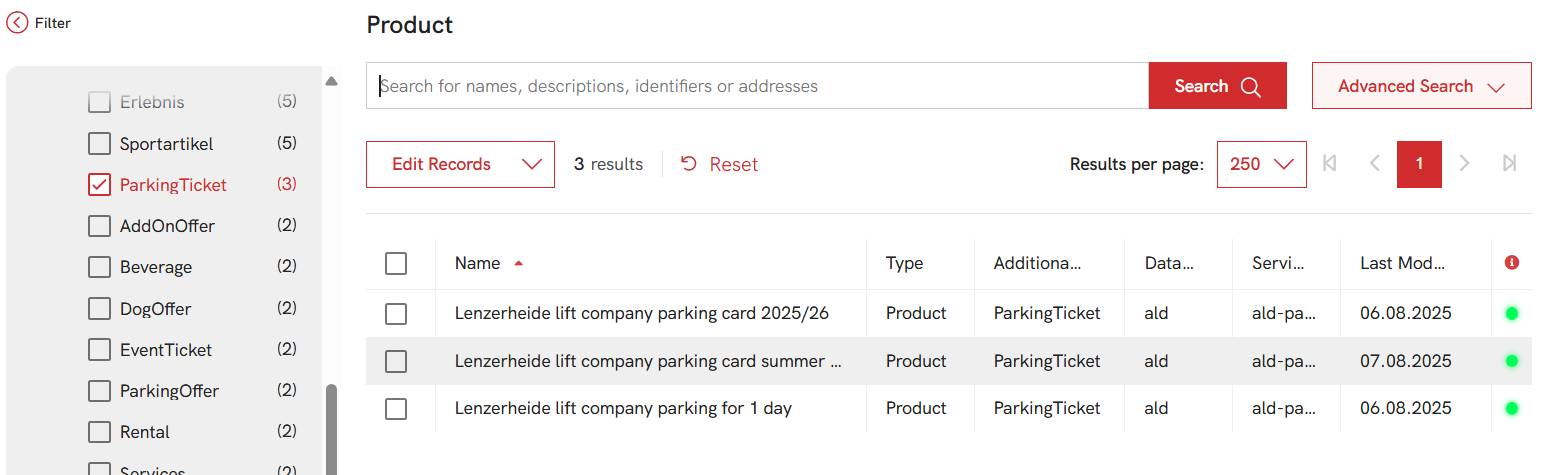
{
    "combinedType": "ParkingTicket",
    "project": [
        "demo-web"
    ],
    "select": "identifier",
    "currentPage": 1,
    "resultsPerPage": "200",
    "facets": []
}
{
    "count": 3,
    "values": [
        {
            "identifier": "ald_parking"
        },
        {
            "identifier": "ald_parking-summer"
        },
        {
            "identifier": "ald_parking-day"
        }
    ]
}
Locations where parking product is valid (Area served)
Parking product contains list of locations where this parking product is valid. List of locations is stored in
the additional property areaServed of the product.
{
    "identifier": "ald_parking",
    "variant": [...],
    "additionalProperty": [
        {
            "audience": [
                "fulfillment"
            ],
            "value": "501-7075,502-7075,503-7075",
            "propertyId": "areaServed"
        }
    ],
    ...
}
Booking a parking
A booking of parking works like any other booking in the marketplace.
Step 1 - creating order
Depending on if you use the B2C or B2B approach the way to get an empty order is a bit different. But that's what you need to do first.
Step 2 - Adding an order item with parking product
Create an order item with parking product, providing the required information defined in the product.
{
    "orderQuantity": 1,
    "orderedItem": {
        "product": {
            "identifier": "ald_parking"
        },
        "validFrom": "2025-09-05T09:00:00",
        "validUntil": "2025-09-05T21:00:00",
        "vehicle": [
            {
                "licensePlateNumber": "ZH 123456",
                "countryOfRegistration": "CH"
            }
        ]
    }
}
Step 3 - Placing the order
Place the order before proceeding to the payment step.
Step 4 - Accept terms and conditions
As usual, all terms which are contained in the order must be accepted.
Step 5 - Payment
Step 6 - poll the order
GET https://api.discover.swiss/test/market/v1/orders/25-102000
The order is ready to get all information when it has reached the state Delivered. The confirmation mail has been sent when it has reached state Fulfilled. Stop polling as well when it has reached the state FulfillmentError. In this case, something was not successful and you can find information in orderItem.StatuesText
Step 7 - Validating the ticket
After the order is fulfilled - parking ticket can be validated via the Validity Service.
GET https://api.discover.swiss/test/validity/v1/validate/{holder}&validFor={locationId}
- holder: the license plate number of the vehicle
- validFor: the location id of the parking which is stored in the
additionalProperty.areaServedproperty of the parking product.
Possible responses
- 200 and empty array - the ticket is not valid in any location
- 200 and array with one or more entries - the ticket is valid in the given location(s)